Choroboros

Choroboros · Create

Create.

Build and shape custom chorus engines inside Choroboros.

Included in the paid edition.

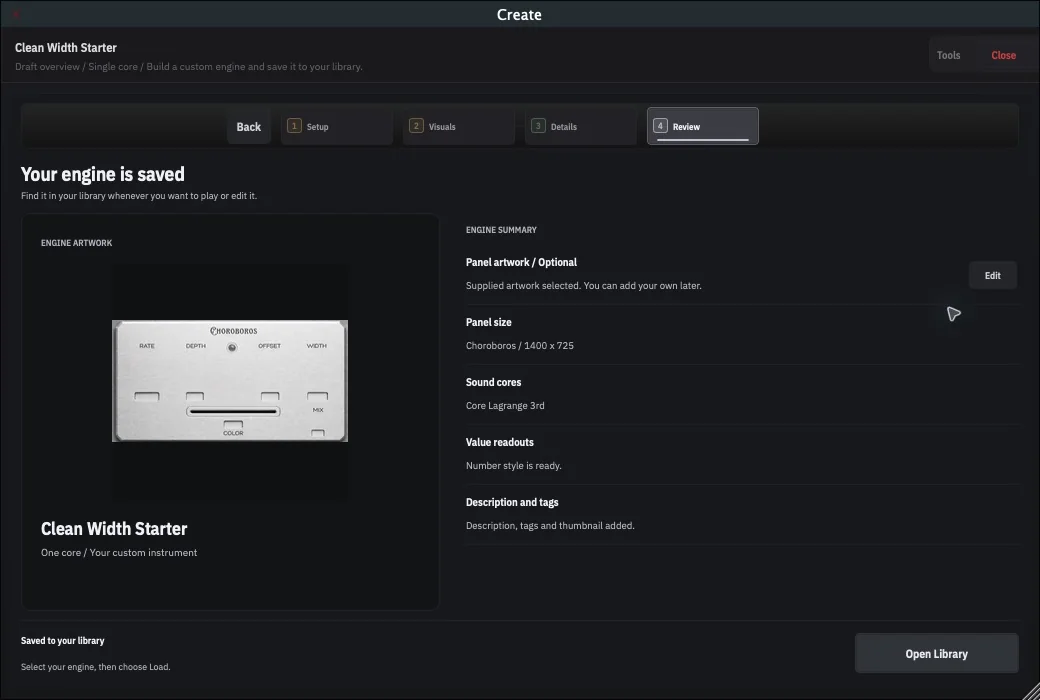
Choroboros Create Review showing a saved custom engine, its artwork and engine summary, and the Open Library action
Interface capture from Choroboros 1.0.5: Review after Save Engine, with the saved confirmation and Open Library.

What it is

Create is the workshop inside Choroboros. Start from the engine library, choose a sound core, shape the artwork, and save a custom engine. It unlocks with a paid licence.

New engine

Four stages, then save.

A new engine moves through Setup, Visuals, Details, and Review. Save Engine writes it to your library, and the saved confirmation offers Open Library so you can select the finished design straight away.

Stage 01

Setup

Choose one core or two from 17 supplied cores: the ten used by the five prebuilt engines, plus seven additional cores. Then set the panel size and use a supplied artwork pack or import your own. Preview auditions a lane; Modify makes an editable copy of a factory recipe.

Stage 02

Visuals

Open each visual group and select the part you want: the main knobs, the Mix knob, and the slider thumb. Two-core engines also expose switch artwork.

Stage 03

Details

Give the engine a recognisable name, a thumbnail, a description, and tags for its library card.

Stage 04

Review

Check your engine’s summary and artwork. Correct anything blocking the save, choose Save Engine, then Open Library to find the finished design.

Saved to your library. Select your engine, then choose Load.

What you can shape

Sound, feel, and presentation.

The engine library, core recipes, and guided editor keep sound and artwork together without hiding the next step.

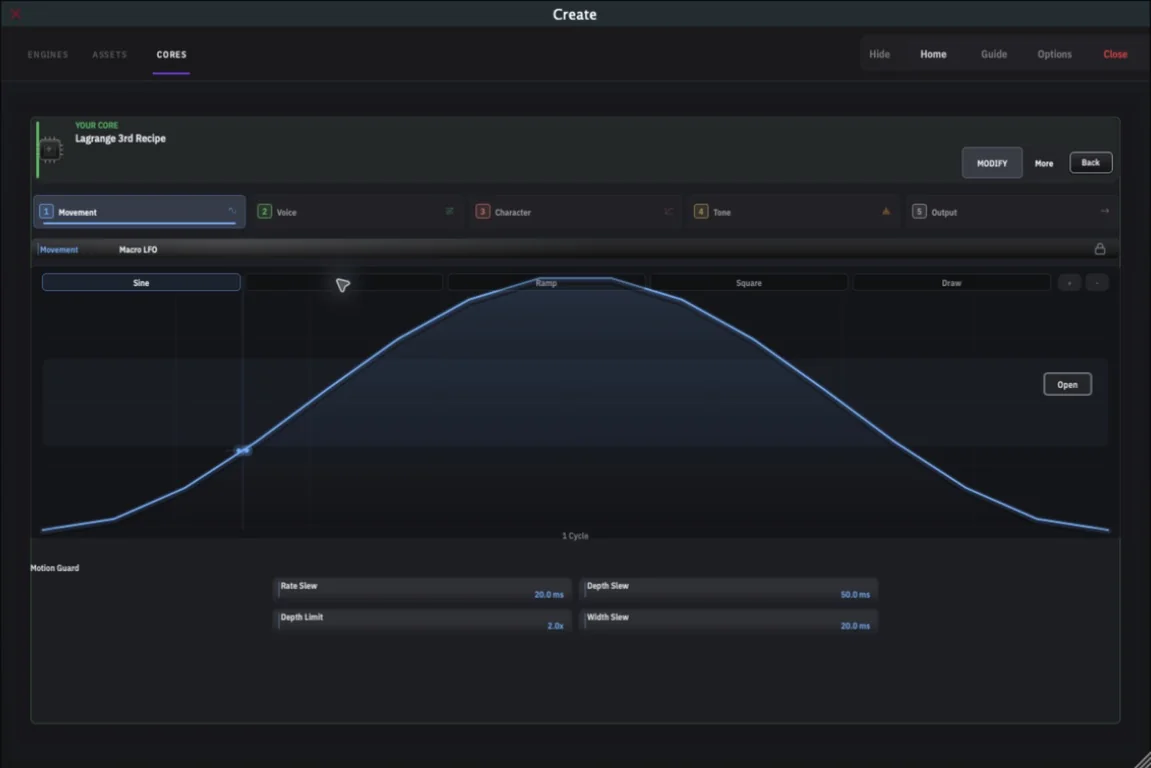
Choroboros Create sound workspace with an editable Lagrange 3rd core recipe, its Movement stage, and a motion curve
Interface capture from Choroboros 1.0.5: a Lagrange 3rd recipe in the Sound workspace, tuning the motion of a custom core.

Engine Builder

Your engine library.

Find the five factory engines and the designs you’ve saved. Start a new engine here, then return to load it after Review.

Sound

The primary creative workspace.

Choose a supplied core or modify a user recipe, then tune the delay, motion, character, and saturation controls that define the engine’s sound.

Look

Visual customization.

Choose panel artwork, knob sheets, a slider thumb, and a thumbnail from supplied parts or your own PNGs. Preview the finished look at the plug-in’s actual size.

Technical controls stay separated from everyday sound design.
Save and share

Engines as files.

Save engines to your local library. Signed .kzn exports can travel between Choroboros installs; .kzn.zip bundles include user artwork. Export requires an active saved licence or trial and an internet connection.

How it pairs

Artwork that matches the sound.

Choroboros ships with a factory set of knob spritesheets across five color families. Beyond that, Create’s Look workspace is built around replaceable visual assets.

Factory artwork

The included look for the five release engines.

Kaizen DSP asset packs

Additional knob sets, slider thumbs, and backgrounds published over time.

Your own artwork

Custom back panels, knobs, slider thumbs, and accents for personal engine designs.

What it isn’t

Create isn’t a modular DAW and it isn’t a coding environment. It is a focused workshop for building chorus engines inside Choroboros, using the sound engine that ships with the plugin.

How to get it

Create ships with Choroboros. $49.99 USD.

One number. The five included engines, Create, lifetime updates, and a 30-day refund.