Sculpt
Turn individual frequency bands
into harmonies.
Build up to six pitch and formant voices inside each of eight frequency bands. Blend them with your original sound, then add effects you already own.
64 seconds. One continuous passage.
Pitch one band.
Change the harmony.
Press play with sound. Hear a single band shift pitch from the opening moment, then hear it back in the mix. Keep listening for formant shaping, attenuation and effects inside individual bands.
- 00:00Pitch & formant
A soloed band changes pitch, then formant.
- 00:08EQ & cuts
Gain, frequency and Q move into high and low cuts.
- 00:24External attenuation
The drums drive reduction in another band.
- 00:34Your effects, by band
Choroboros and ValhallaVintageVerb, with their own editors.
- 00:50Six voices
Pitch/formant voices enter one by one, with audio-driven mix automation.
Eight independent channels
Work inside the sound.
Give every band its own channel.
Set frequency, Q and gain. Choose a filter shape, solo a band, and hear it in context. Use the first and last bands for high and low cuts with adjustable slopes.
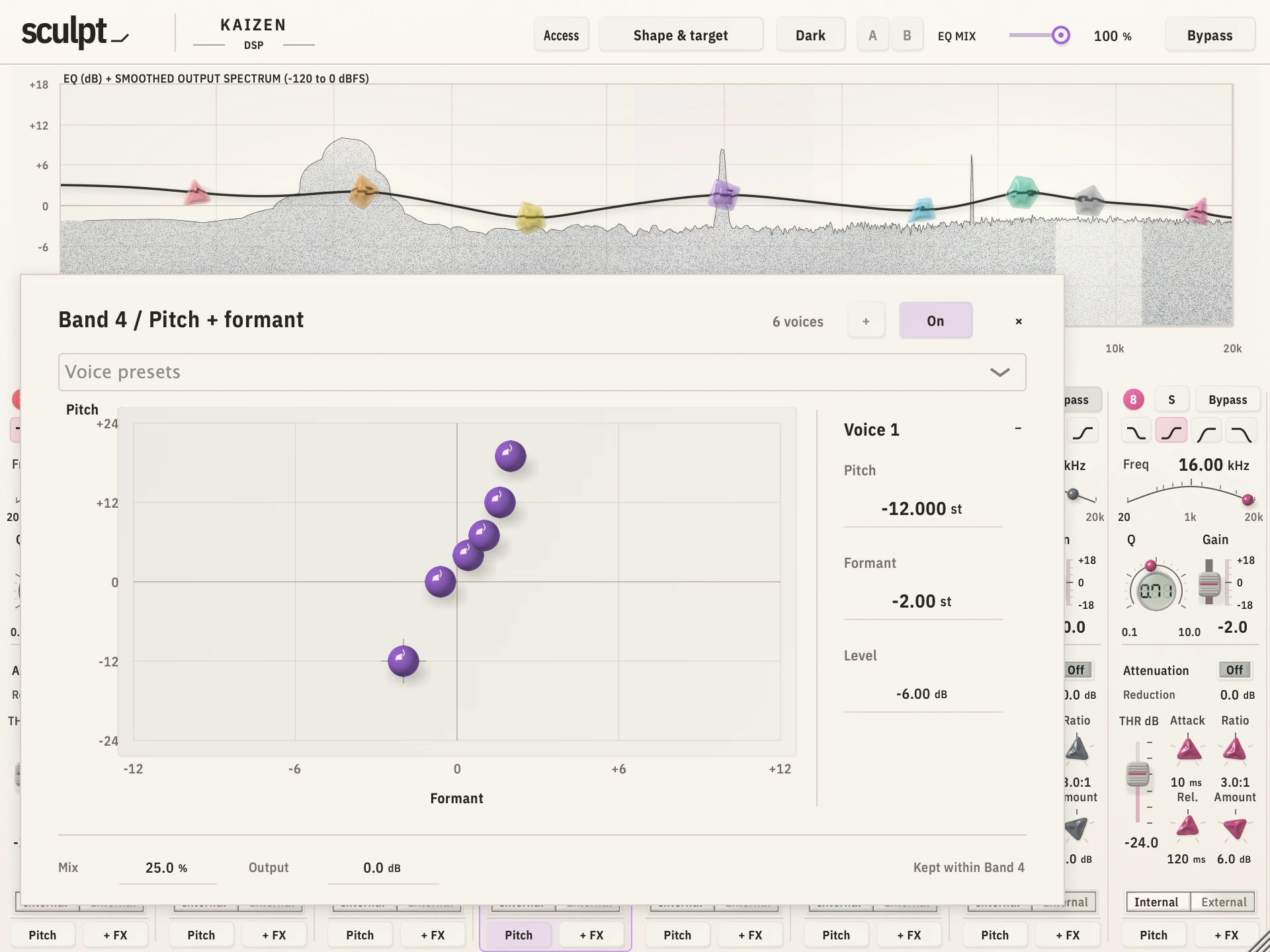
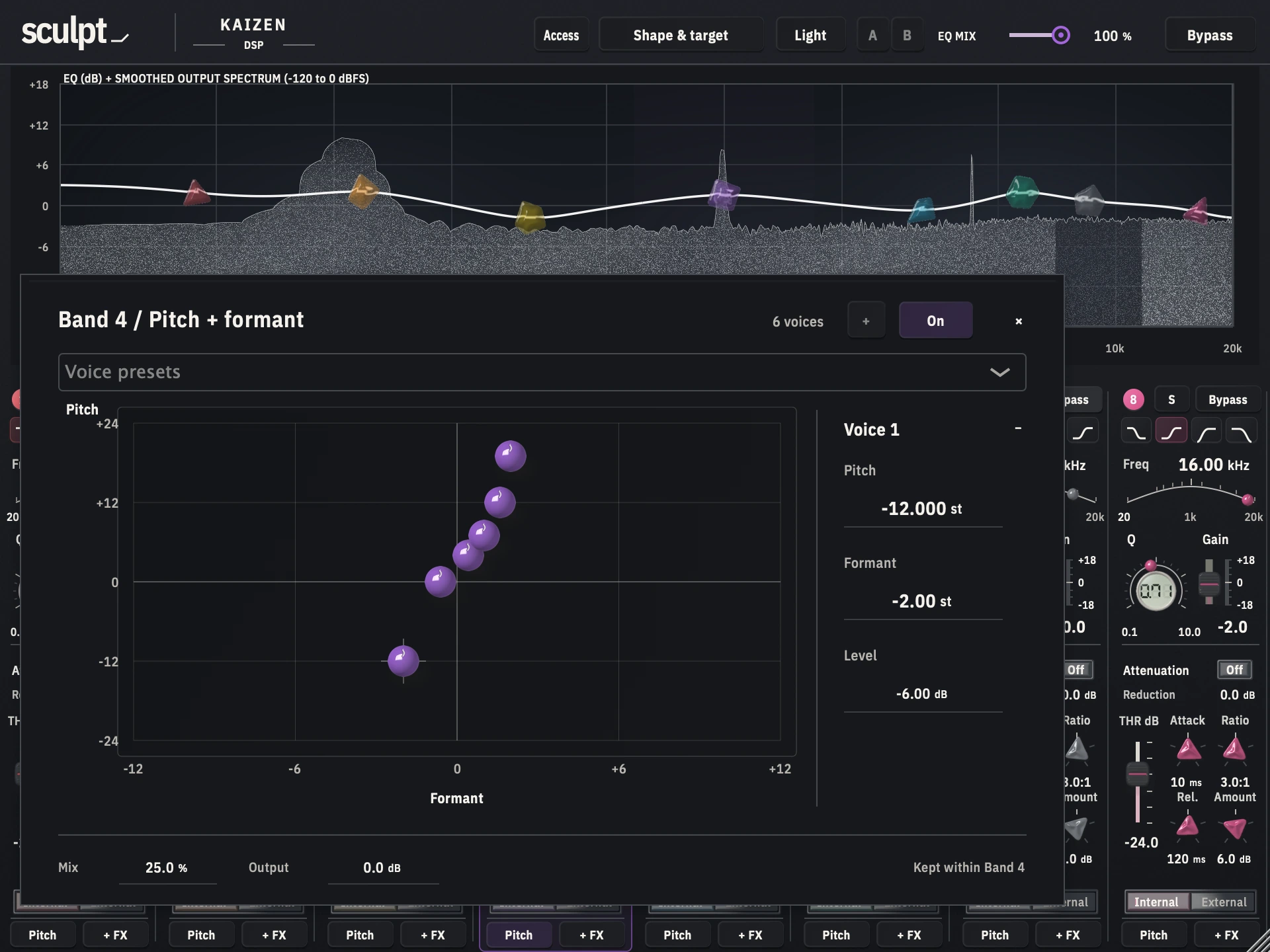
Put the voices where you want them.
Place up to six voices on each pitch/formant matrix. Move each sphere, set its level, and blend the shifted sound with the original. Automatic containment keeps pitch processing within its routing band before effects.
Make room when the kick hits.
Threshold, attack, ratio, release and maximum reduction for each band. Use internal detection or route an external mono or stereo sidechain into Sculpt.
Your plug-ins. Inside the band.
Build an ordered chain, open each plug-in’s own editor, and balance insert mix and chain mix. Chorus on one band. Reverb on another.
Release preparation
Sculpt
US$39.99 regular price
US$19.99 introductory price for the first calendar month from public launch, then US$39.99. One-time purchase, plus applicable tax. The offer clock starts when the release opens.
Public checkout and downloads are being prepared. Your licence key will work with the released installer once it is available here. The introductory offer has not started.
Install the plug-in, then choose Free or Access in its header, paste your licence key and press Activate. Existing owners can use their permanent key.
Trial email verificationA few useful details.
What can I put in an effect chain?
Stereo VST3 effects, plus Audio Unit effects on Mac. Each band hosts up to eight effects within a combined reported latency of 256 samples. Third-party plug-ins are installed separately.
Does the pitch matrix stay inside the band?
The matrix filters shifted voices back toward the routing band before the effect chain. Effects such as reverb can then add their own tails.
Can I resize it or change the colours?
Yes. Resize the editor to fit your session, choose light or dark mode, and save your band colours. The smoothed spectrum follows the processed output.
Where are the manual and installation instructions?
Install the package for your platform with your DAW closed. Reopen your DAW and rescan plug-ins if needed. Open Sculpt’s Free or Access panel to activate your key. A permanent licence works offline after activation; a full trial needs a connection at least every 72 hours. For product questions, contact Kaizen support.